Use this documentation with care! It describes
the heavily outdated version 5, which was actively
developed around 2010 and is considered dead by the
rsyslog team for many years now.
This documentation reflects the latest update of the
previously existing (now removed) v5-stable branch.
It describes the 5.10.2 version, which was never
released. As such, it contains some content that
does not apply to any released version.
To obtain the doc that properly matches your installed
v5 version, obtain the doc set from your distro. Each
version of rsyslog contained the version that exactly
matches it.
As general advise, it is strongly suggested to
upgrade to the current version supported by the rsyslog
project. The current version can always be found on
the right-hand side info box on the
rsyslog web site.
Note that there is no rsyslog community support available
for this heavily outdated version. If you need to stick
with it, please ask your distribution for support.
Setting up the UDP syslog relay
In this step, we configure the UDP relay ada.example.net. As a reminder, that machine relays messages from a local router, which only supports UDP syslog, to the central syslog server. The router does not talk directly to it, because we would like to have TLS protection for its sensitve logs. If the router and the syslog relay are on a sufficiently secure private network, this setup can be considered reasonable secure. In any case, it is the best alternative among the possible configuration scenarios.
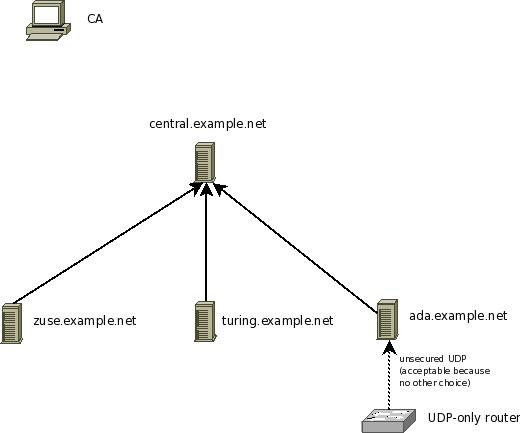
Steps to do:
- make sure you have a functional CA (Setting up the CA)
- generate a machine certificate for ada.example.net (follow instructions in Generating Machine Certificates)
- make sure you copy over ca.pem, machine-key.pem ad machine-cert.pem to the client. Ensure that no user except root can access them (even read permissions are really bad).
- configure the client so that it checks the server identity and sends messages only if the server identity is known.
These were essentially the same steps as for any TLS syslog client. We now need to add the capability to forward the router logs:
- make sure that the firewall rules permit message recpetion on UDP port 514 (if you use a non-standard port for UDP syslog, make sure that port number is permitted).
- you may want to limit who can send syslog messages via UDP. A great place to do this is inside the firewall, but you can also do it in rsyslog.conf via an $AllowedSender directive. We have used one in the sample config below. Please be aware that this is a kind of weak authentication, but definitely better than nothing...
- add the UDP input plugin to rsyslog’s config and start a UDP listener
- make sure that your forwarding-filter permits to forward messages received from the remote router to the server. In our sample scenario, we do not need to add anything special, because all messages are forwarded. This includes messages received from remote hosts.
At this point, please be reminded once again that your security needs may be quite different from what we assume in this tutorial. Evaluate your options based on your security needs.
Sample syslog.conf
Keep in mind that this rsyslog.conf sends messages via TCP, only. Also, we do not show any rules to write local files. Feel free to add them.
# start a UDP listener for the remote router
$ModLoad imudp    # load UDP server plugin
$AllowedSender UDP, 192.0.2.1 # permit only the router
$UDPServerRun 514 # listen on default syslog UDP port 514

# make gtls driver the default
$DefaultNetstreamDriver gtls

# certificate files
$DefaultNetstreamDriverCAFile /rsyslog/protected/ca.pem
$DefaultNetstreamDriverCertFile /rsyslog/protected/machine-cert.pem
$DefaultNetstreamDriverKeyFile /rsyslog/protected/machine-key.pem

$ActionSendStreamDriverAuthMode x509/name
$ActionSendStreamDriverPermittedPeer central.example.net
$ActionSendStreamDriverMode 1 # run driver in TLS-only mode
*.* @@central.example.net:10514 # forward everything to remote server
Be sure to safeguard at least the private key (machine-key.pem)! If some third party obtains it, you security is broken!